# pipelines

Pipelines are the methods used to analyze data after it has been collected. In other words, the experiment provides the methods to collect the data and the pipelines provide the methods to analyze the data once it has been collected.

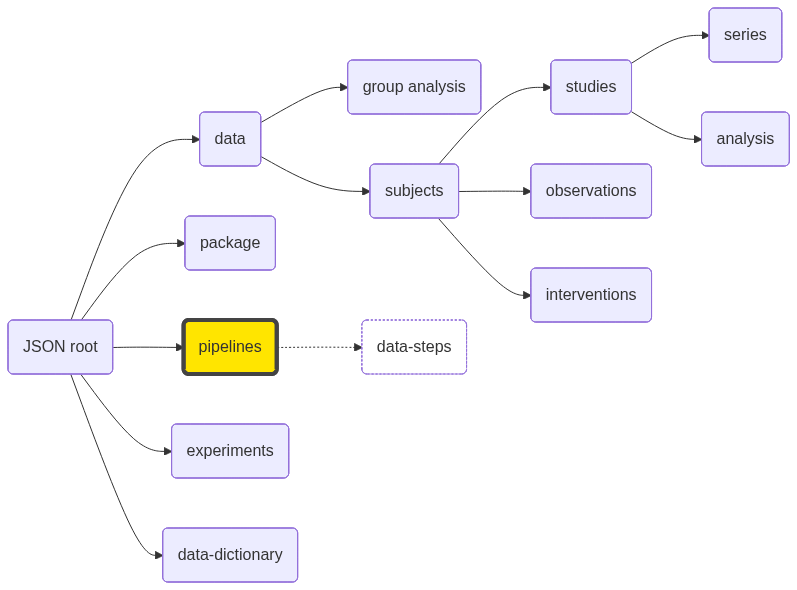
<figure><img src="https://mermaid.ink/img/pako:eNptklFPwyAQx79Kg1nCktYspr7UZE_6Yowm7s305VauK64FAlTXLPvuQjtw1vWh_I_7HX8OOJJKMiQF2WlQTfLyXorEfVpKS583b6-jWmbZmoEF6n_Lh1_EzSuo9rBDeh7nWa6w5QINjWpG4EGh5h0Ka-iFnlHeOGO8slwK0AOdxcsJHmez9U7LXoGAdjDc0DFKQhjWPaOm335i5ayDCPkQe8b2jLsOzuMVQm4N6i_wmzH0MrjCcmFd2rU4wn-iSE9G3todh3ceh__p2OO8u8ViKslu_QVp6EzNW39HXgYo3oin_HkYi8pMRzvKAAbbocUkcolbsS1u6rpOXUrLPWYMTANaw1DcXZZEn1iC96tVOhUVN3men3X2zZltilwdSEo61B1w5l7m0S9WEttghyUpnGRYQ9_akpTi5NBeuV3hE-NWalLU0BpMCfRWbgZRkcLqHgP0yME99C5S7pl8SBni0w9HOA2R?type=png" alt=""><figcaption></figcaption></figure>

### JSON Variables

:blue\_circle: Primary key\
:red\_circle: Required\
:yellow\_circle: Computed (squirrel writer/reader should handle these variables)

<table data-full-width="true"><thead><tr><th width="288" align="right">Variable</th><th width="128.00000000000003">Type</th><th width="94">Default</th><th>Description</th></tr></thead><tbody><tr><td align="right"><code>ClusterType</code></td><td>string</td><td></td><td>Compute cluster engine (sge or slurm).</td></tr><tr><td align="right"><code>ClusterUser</code></td><td>string</td><td></td><td>Submit username.</td></tr><tr><td align="right"><code>ClusterQueue</code></td><td>string</td><td></td><td>Queue to submit jobs.</td></tr><tr><td align="right"><code>ClusterSubmitHost</code></td><td>string</td><td></td><td>Hostname to submit jobs.</td></tr><tr><td align="right"><code>CompleteFiles</code></td><td>JSON array</td><td></td><td>JSON array of complete files, with relative paths to <code>analysisroot</code>.</td></tr><tr><td align="right"><code>CreateDate</code></td><td>datetime</td><td><span data-gb-custom-inline data-tag="emoji" data-code="1f534">🔴</span></td><td>Date the pipeline was created.</td></tr><tr><td align="right"><code>DataCopyMethod</code></td><td>string</td><td></td><td>How the data is copied to the analysis directory: <code>cp</code>, <code>softlink</code>, <code>hardlink</code>.</td></tr><tr><td align="right"><code>DependencyDirectory</code></td><td>string</td><td></td><td> </td></tr><tr><td align="right"><code>DependencyLevel</code></td><td>string</td><td></td><td> </td></tr><tr><td align="right"><code>DependencyLinkType</code></td><td>string</td><td></td><td> </td></tr><tr><td align="right"><code>Description</code></td><td>string</td><td></td><td>Longer pipeline description.</td></tr><tr><td align="right"><code>DirectoryStructure</code></td><td>string</td><td></td><td> </td></tr><tr><td align="right"><code>Directory</code></td><td>string</td><td></td><td>Directory where the analyses for this pipeline will be stored. Leave blank to use the default location.</td></tr><tr><td align="right"><code>Group</code></td><td>string</td><td></td><td>ID or name of a group on which this pipeline will run</td></tr><tr><td align="right"><code>GroupType</code></td><td>string</td><td></td><td>Either subject or study</td></tr><tr><td align="right"><code>Level</code></td><td>number</td><td><span data-gb-custom-inline data-tag="emoji" data-code="1f534">🔴</span></td><td>subject-level analysis (1) or group-level analysis (2).</td></tr><tr><td align="right"><code>MaxWallTime</code></td><td>number</td><td></td><td>Maximum allowed clock (wall) time in minutes for the analysis to run.</td></tr><tr><td align="right"><code>ClusterMemory</code></td><td>number</td><td></td><td>Amount of memory in GB requested for a running job.</td></tr><tr><td align="right"><code>PipelineName</code></td><td>string</td><td><span data-gb-custom-inline data-tag="emoji" data-code="1f534">🔴</span> <span data-gb-custom-inline data-tag="emoji" data-code="1f535">🔵</span></td><td>Pipeline name.</td></tr><tr><td align="right"><code>Notes</code></td><td>string</td><td></td><td>Extended notes about the pipeline</td></tr><tr><td align="right"><code>NumberConcurrentAnalyses</code></td><td>number</td><td><code>1</code></td><td>Number of analyses allowed to run at the same time. This number if managed by NiDB and is different than grid engine queue size.</td></tr><tr><td align="right"><code>ClusterNumberCores</code></td><td>number</td><td><code>1</code></td><td>Number of CPU cores requested for a running job.</td></tr><tr><td align="right"><code>ParentPipelines</code></td><td>string</td><td></td><td>Comma separated list of parent pipelines.</td></tr><tr><td align="right"><code>ResultScript</code></td><td>string</td><td></td><td>Executable script to be run at completion of the analysis to find and insert results back into NiDB.</td></tr><tr><td align="right"><code>SubmitDelay</code></td><td>number</td><td></td><td>Delay in hours, after the study datetime, to submit to the cluster. Allows time to upload behavioral data. </td></tr><tr><td align="right"><code>TempDirectory</code></td><td>string</td><td></td><td>The path to a temporary directory if it is used, on a compute node. </td></tr><tr><td align="right"><code>UseProfile</code></td><td>bool</td><td></td><td>true if using the profile option, false otherwise.</td></tr><tr><td align="right"><code>UseTempDirectory</code></td><td>bool</td><td></td><td>true if using a temporary directory, false otherwise.</td></tr><tr><td align="right"><code>Version</code></td><td>number</td><td><code>1</code></td><td>Version of the pipeline.</td></tr><tr><td align="right"><code>PrimaryScript</code></td><td>string</td><td><span data-gb-custom-inline data-tag="emoji" data-code="1f534">🔴</span></td><td>See details of <a href="pipelines/pipeline-scripts">pipeline scripts</a></td></tr><tr><td align="right"><code>SecondaryScript</code></td><td>string</td><td></td><td>See details of <a href="pipelines/pipeline-scripts">pipeline scripts</a>.</td></tr><tr><td align="right"><code>DataStepCount</code></td><td>number</td><td><span data-gb-custom-inline data-tag="emoji" data-code="1f7e1">🟡</span></td><td>Number of data steps.</td></tr><tr><td align="right"><code>VirtualPath</code></td><td>string</td><td><span data-gb-custom-inline data-tag="emoji" data-code="1f7e1">🟡</span></td><td>Path of this pipeline within the squirrel package.</td></tr><tr><td align="right"><a href="pipelines/data-steps">data-steps</a></td><td>JSON array</td><td></td><td>See <a href="pipelines/data-steps">data specifications</a></td></tr></tbody></table>

### Directory structure

Files associated with this section are stored in the following directory. `PipelineName` is the unique name of the pipeline.

> `/pipelines/<PipelineName>`


---

# Agent Instructions: Querying This Documentation

If you need additional information that is not directly available in this page, you can query the documentation dynamically by asking a question.

Perform an HTTP GET request on the current page URL with the `ask` query parameter:

```
GET https://docs.neuroinfodb.org/nidb/contribute/squirrel-data-sharing-format/specification-v1.0/pipelines.md?ask=<question>
```

The question should be specific, self-contained, and written in natural language.
The response will contain a direct answer to the question and relevant excerpts and sources from the documentation.

Use this mechanism when the answer is not explicitly present in the current page, you need clarification or additional context, or you want to retrieve related documentation sections.